

This guide is in English for now. The tool itself works in your language.
Nivesh Sahayak App › Help › Everyday work
Record money received against bills
Record a customer's payment once and tell the App which bills it pays. The App then knows exactly which bills are still due, for how long, and how much advance the customer has with you.
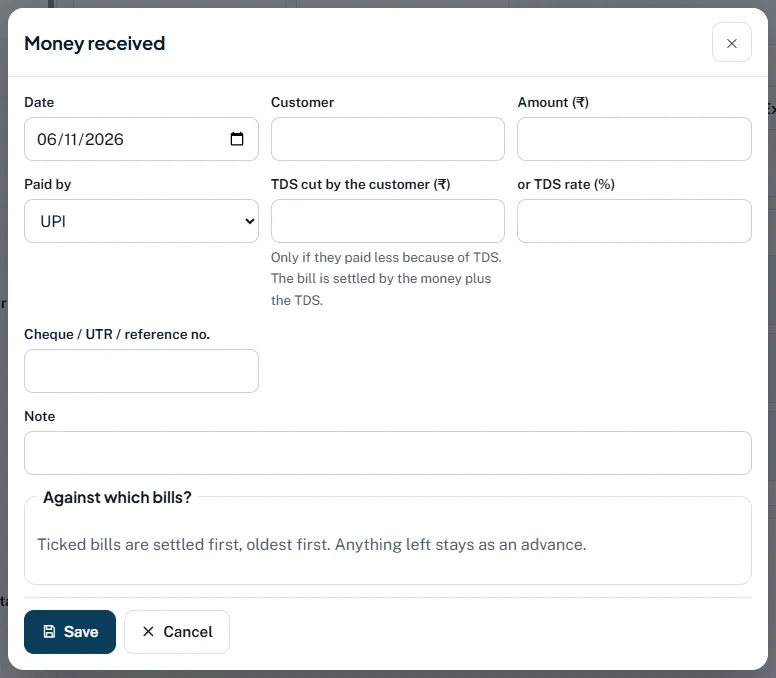
Step by step
- Open the form. Dashboard › Quick add › Money received, or Money in and out › Money received, or press R. From a due bill, press Record payment.
- Fill in Date, Customer and Amount (₹). Saved customers come up as you type.
- Choose Paid by. Cash, UPI, Cheque, Bank transfer, Card, Demand draft or Other. Cash goes to the cash book, the rest to the bank book. For a cheque, more fields appear: Cheque date, Bank of the cheque and Cheque status.
- TDS, only if the customer cut it. Type TDS cut by the customer (₹) or TDS rate (%). The bill is settled by the money plus the TDS.
- Reference. Type the cheque, UTR or UPI reference in Cheque / UTR / reference no. It shows on the receipt and in the ledger.
- Tick the bills under Against which bills? Ticked bills are settled first, oldest first. Anything left stays as an advance and is used by the customer's next bills.
- Save. The receipt gets the next receipt number and can be opened, printed or shared with Open.
Worked example
Gill Builders owes two bills: ₹8,024 (23 Aug) and ₹3,068 (4 Nov). They pay ₹10,000 by bank transfer and cut TDS of ₹92 on the newer bill.
- Amount ₹10,000, Paid by Bank transfer, TDS cut ₹92, tick both bills.
- Settled: ₹8,024 (first bill, fully) + ₹1,976 of money and ₹92 TDS on the second = ₹2,068.
- Still due on the second bill: ₹3,068 − ₹2,068 = ₹1,000.
Their ledger now shows ₹1,000 Dr, and the TDS of ₹92 waits as TDS receivable for your income-tax return.
Rules and dates
TDS by your customer counts as tax paid on your behalf: check it in Form 26AS / the annual information statement before you file. A customer deducts TDS only under the income-tax sections that apply to them (from 1 April 2026 under the Income-tax Act, 2025).
Common mistakes and how to fix them
- Nothing ticked, so the oldest bill was settled. That is the rule when nothing is ticked. Edit the entry and tick the bill the customer named.
- Receiving an advance before the bill. Record it without ticking any bill. It stays as an advance and settles the next bill by itself.
- Typing the money plus TDS in Amount. Amount is only what reached you. TDS goes in its own box.
- Cheque counted in the bank too early. Set Cheque status to Received or Deposited. Only Cleared counts as money in the bank.