

This guide is in English for now. The tool itself works in your language.
Nivesh Sahayak App › Help › Getting started
The dashboard: your business at a glance
The dashboard is the first screen of the App. It answers four daily questions: how much did I sell, who owes me, whom do I owe, and how much money do I have.
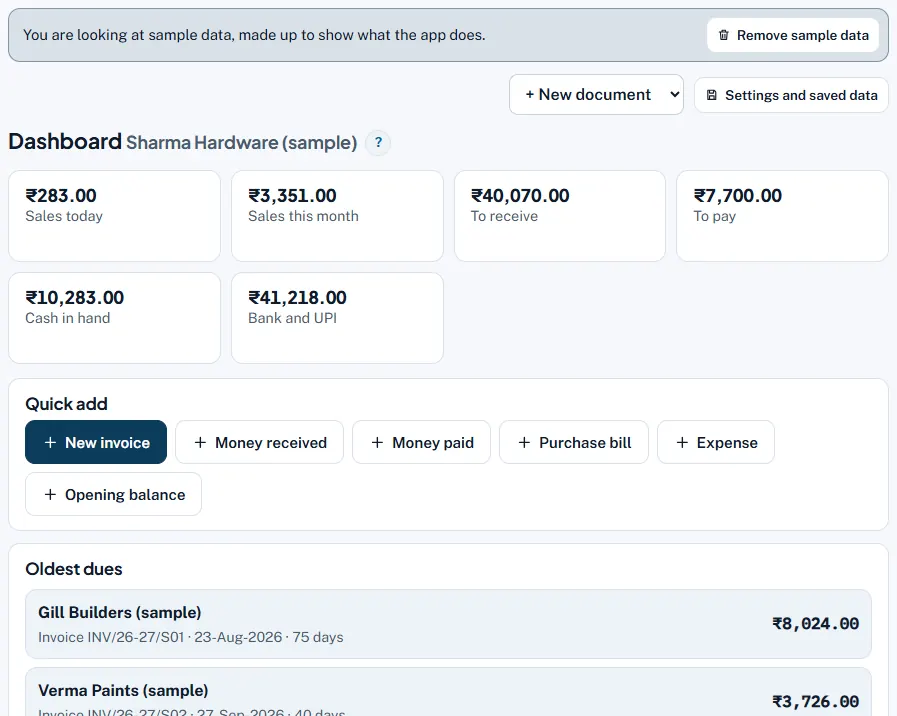
What each part shows
- Sales today and Sales this month. Total of invoices and cash memos dated today and in this calendar month, including GST.
- To receive and To pay. What customers still owe you and what you still owe suppliers, after every payment, credit note and debit note.
- Cash in hand and Bank and UPI. Worked out from opening balances, cash and UPI sales, money received and paid, purchases and expenses.
- Quick add. Buttons for New invoice, Money received, Money paid, Purchase bill, Expense and Opening balance.
- Oldest dues. Unpaid bills with the most days, so you know whom to call first.
- Repeating bills. If bills saved with "Repeat this bill" are waiting, a box says so with See and make them.
- Latest entries. Your newest bills and money entries, each with Open, Edit or Delete.
Worked example
In the sample business the dashboard shows: Sales today ₹283 (one cash memo), Sales this month ₹3,351, To receive ₹40,070, To pay ₹7,700, Cash in hand ₹10,283, Bank and UPI ₹41,218. Oldest dues lists Gill Builders, invoice INV/26-27/S01, 75 days, ₹8,024.
Common mistakes and how to fix them
- Cash in hand looks wrong. Add your opening cash with Quick add › Opening balance › Cash in hand on the start date, and make sure every cash expense is entered.
- To receive includes a bill already paid. Record the payment with Money received and tick that bill under Against which bills?
- Several businesses mixed up. The dashboard shows one business at a time; its name is in the heading. Switch the business in the App before reading the figures.
Try it now: it is free and needs no login.Open the App
Related help
Money received against billsRecord a customer's payment once and tell the App which bills it pays. The App then knows exactly which bills are still…Dues and WhatsApp remindersThe Dues screen lists every customer who owes you (and, under To pay, every supplier you owe), split by how old the…Cash and bank booksYou never type the cash book: it is made from your cash sales, money received and paid, purchases and expenses. This…