

This guide is in English for now. The tool itself works in your language.
Nivesh Sahayak App › Help › Accounts and final accounts
Final accounts: profit and loss and balance sheet
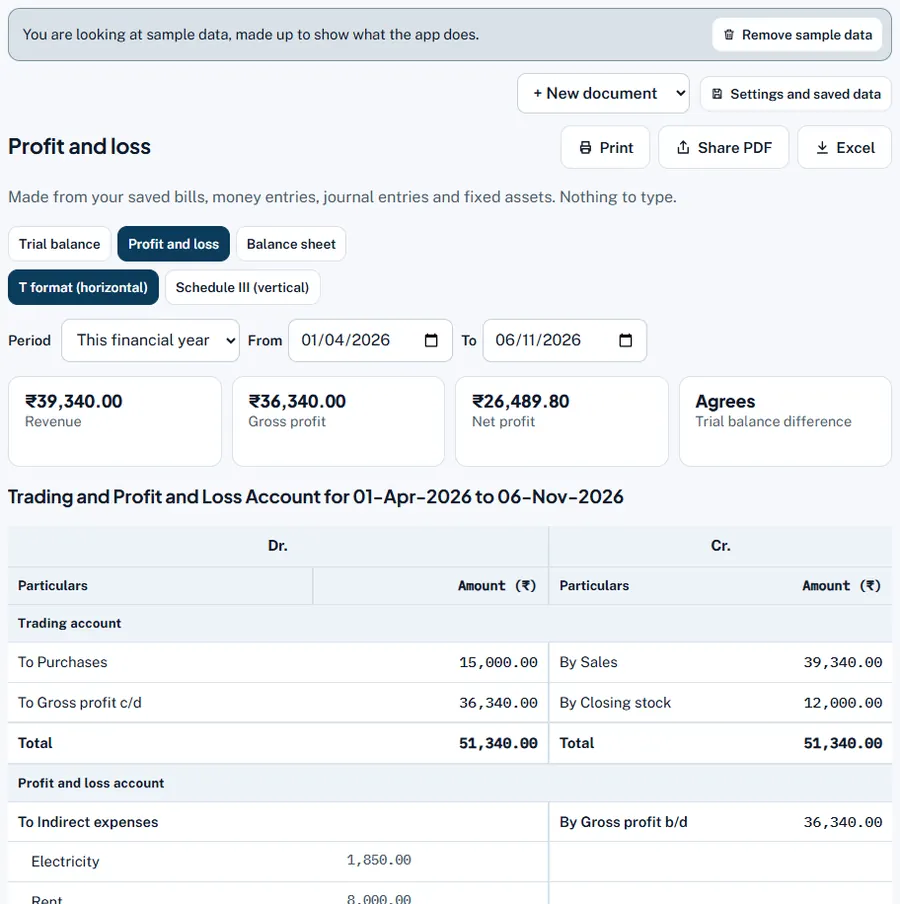
The App makes your trading account, profit and loss account and balance sheet from what you already saved. Choose the classic T format (Dr/Cr, "To" and "By") or the Schedule III vertical format used by companies.
Step by step
- Open Final accounts. Menu › Final accounts, then the Profit and loss or Balance sheet tab.
- Choose the format. T format (horizontal) or Schedule III (vertical). Your choice is remembered (My data › Settings › Final accounts).
- Choose the period. This financial year, Last financial year, This month or Your own dates.
- Check direct and indirect expenses. Gross profit uses direct expenses (wages, freight in, factory power). Press Choose direct and indirect expenses › to mark each head.
- Check the stock method. The note Closing stock valued at: shows Weighted average cost or FIFO; Change it in Settings ›.
- Print, Share PDF or Excel.
Worked example
Sample business in T format: Trading account: To Purchases ₹15,000, To Gross profit c/d ₹36,340 = By Sales ₹39,340 + By Closing stock ₹12,000 (₹51,340). Profit and loss: To Electricity ₹1,850, Rent ₹8,000, Round off ₹0.20, To Net profit ₹26,489.80 = By Gross profit b/d ₹36,340. Balance sheet: Capital ₹65,000 + profit ₹26,489.80 = ₹91,489.80, creditors ₹7,700, GST payable ₹4,381.20, total ₹1,03,571 = stock ₹12,000 + debtors ₹40,070 + cash ₹10,283 + bank ₹41,218.
Previous year column
In Schedule III (vertical) format the App adds a Previous year (₹) column for the same dates one year earlier. Years with no records show "—". The T format has no previous-year column yet.
More accounts
Under More accounts: open the Manufacturing account, Partners' accounts for a firm or LLP, and Receipts and payments / Income and expenditure for a trust, society or school.
Common mistakes and how to fix them
- The balance sheet does not agree. The App says by how much. An opening balance (capital, stock, assets, loans) is probably missing: add it as a journal entry.
- Gross profit looks too high. Opening stock or direct expenses may be missing, or purchases not entered. Check with the profit report.