

This guide is in English for now. The tool itself works in your language.
Nivesh Sahayak App › Help › Getting started
Make any document inside the App
Every Nivesh Sahayak document maker (invoice, quotation, proforma, sales order, challan, purchase order, notes, cash memo, receipt, voucher, self invoice, rent receipt, salary slip, petty cash) opens inside the App, so you never leave it.
Step by step
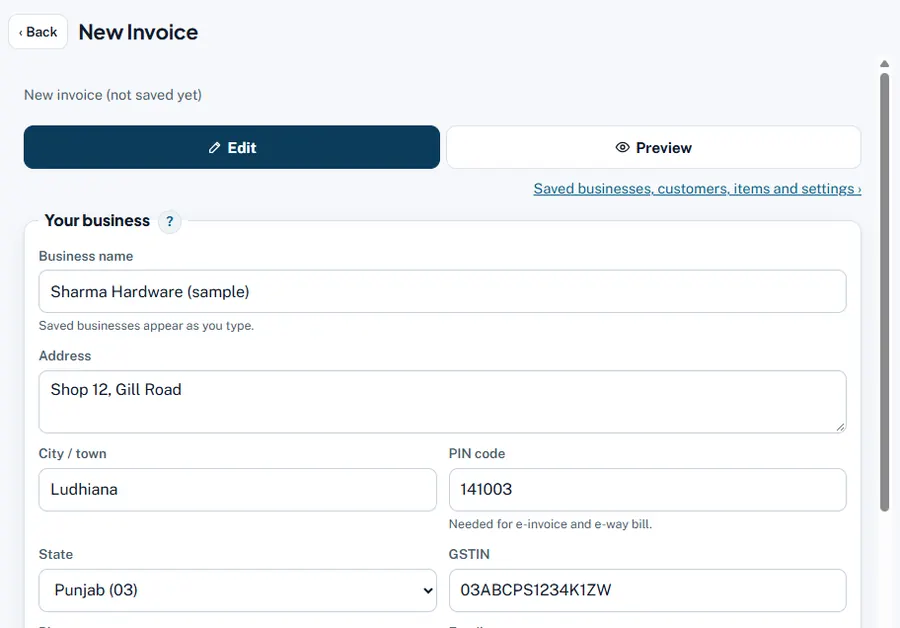
- Choose + New document. At the top of every App screen, open + New document and pick the kind, for example Invoice or Quotation.
- Fill it in. The maker opens under a row with ‹ Back, the document name and Open in a new tab. Your business, customers and items come up as suggestions, and the next number is filled in.
- Save, then print or share. Press Save, then Print / PDF or Share. The document is saved in the same data home as the App.
- Go back. Press ‹ Back to return to the screen you came from. The new bill is already in Sales, Dues and the dashboard.
- Open or convert a saved one. In Sales, press Open on any bill. On a quotation press Convert to… › Sales order, Delivery challan or Invoice: the maker opens with everything copied.
Worked example
Verma Paints asks for a price. Choose + New document › Quotation, add 20 bags of wall putty at ₹640 (GST 18%): total ₹15,104. Save and share the PDF on WhatsApp. A week later they agree: in Sales press Convert to… › Invoice on QT/26-27/S01. The invoice opens with the same lines and the next invoice number; save it and the quotation shows that an invoice was made.
Common mistakes and how to fix them
- The maker opened the business of another App tab. Each App tab keeps its own business. Choose the business in this tab first; a form refuses to save if the business was changed meanwhile.
- Pressing the browser's back button. It works, but ‹ Back in the App row always returns to the right screen.
- Wanting two documents side by side. Press Open in a new tab.
Try it now: it is free and needs no login.Open the App
Related help
Make a GST invoiceThe invoice maker works out CGST + SGST or IGST from the two states, adds a tax summary by HSN, the amount in words and…Quotation to invoice in one clickWhen the customer accepts, do not type the quotation again. One click copies the customer and every line into a new…Sales: bills and conversionsSales lists every invoice, cash memo, quotation, proforma, sales order, challan and note of the business, newest first,…